
Understand the decision
Sending every missing page to the homepage confuses visitors and can hide underlying problems. The replacement should satisfy the original task closely enough to make the change useful.
Use internal links, previous sitemaps, analytics and known backlinks to find important URLs. Keep a map of old purpose, current response and proposed destination.
A practical workflow
Work through the sequence below. Keep the evidence, the change you make and the acceptance check together so the next person can understand the decision.
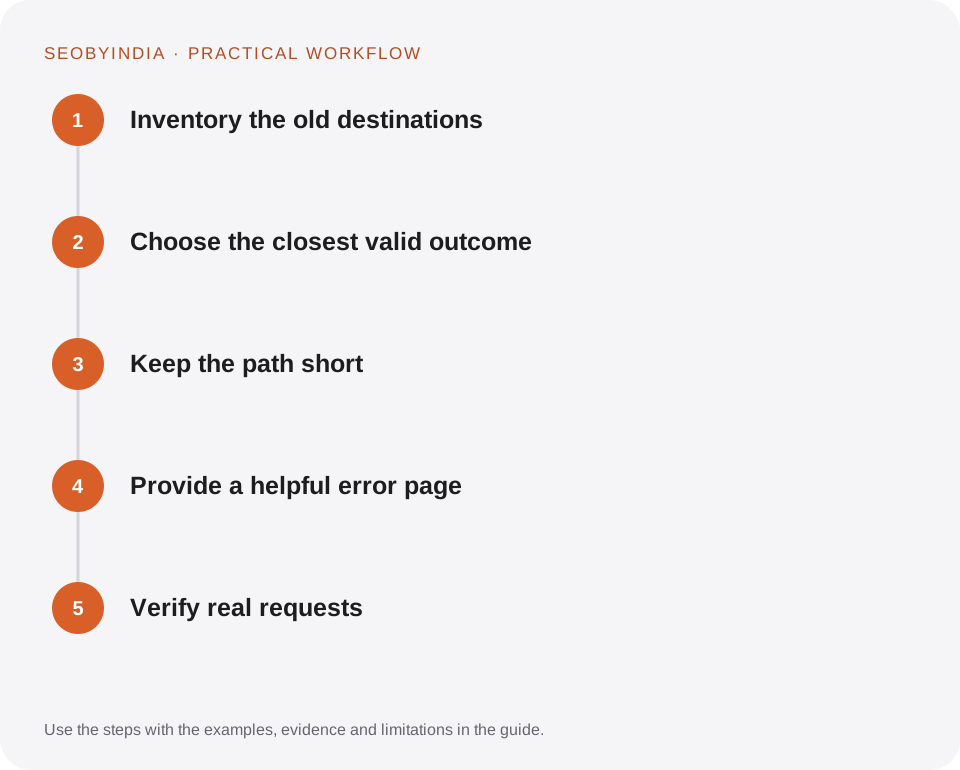
Inventory the old destinations
Use internal links, previous sitemaps, analytics and known backlinks to find important URLs. Keep a map of old purpose, current response and proposed destination.
Choose the closest valid outcome
Redirect a renamed page to its direct replacement. Merge overlapping resources when the combined page genuinely covers both needs. Leave an honest missing-page response for unrelated retired content.
Keep the path short
Update internal links to point to the final destination. Avoid chains and loops. Check scheme and hostname rules together with individual page redirects.
Provide a helpful error page
Explain that the page cannot be found and offer search or relevant navigation. Ensure the error template does not report a successful page response.
Verify real requests
Follow important old URLs after launch and inspect the final page. Retest linked files as well as HTML pages. Monitor newly reported errors for patterns.
Illustrative scenario
What this looks like in practice
A guide is renamed from an old generic slug to a specific one. A permanent redirect takes visitors directly to the new guide, related internal links are updated and the sitemap lists only the final URL.
This is a worked example, not a claim about a client campaign or a promised result.
Before you sign it off
Do not redirect a removed plumbing article to an unrelated AI marketing page simply to avoid a 404 count. Relevance is part of the decision.
Keep a useful decision record
- Purpose
- Write the customer task this change is meant to improve.
- Evidence
- Save the relevant page, source or observation and its date.
- Owner
- Identify who implements the change and who verifies it.
- Acceptance
- State what a correct result looks like before measuring its wider effect.
What to measure
Track broken internal links, redirect chains, important external entry points and successful final destinations.
Record the baseline and the observation window. If the measurement setup changes, annotate the report before comparing periods. Use the findings to choose the next useful improvement, rather than treating one encouraging result as proof of a permanent outcome.
Sources and further reading
These primary references provide platform guidance and context. The workflows and scenarios on this page are editorial explanations; a source link does not turn an example into a measured result.
Need help applying this?
Start with your website, target audience and the problem you want to solve. We can agree on the useful work, implementation responsibilities and reporting.
Explore the relevant serviceDiscuss the scope